
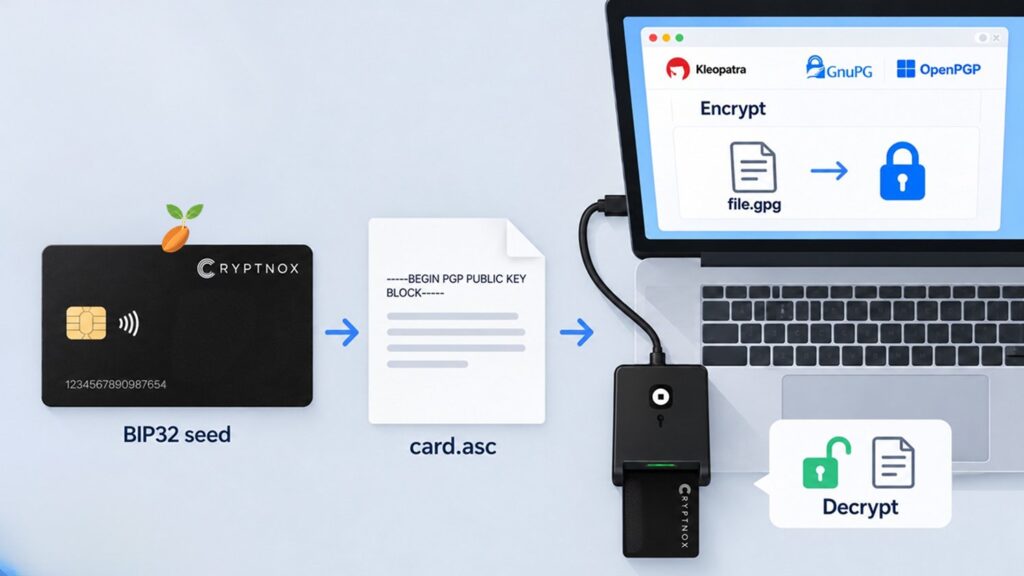
OpenPGP Smart Card Encryption: Encrypt in Kleopatra, Decrypt With Your Cryptnox Wallet Card
An OpenPGP smart card keeps your decryption key inside a chip, so a stolen laptop or a malware infection cannot copy it. Until now that meant a USB token, a key-generation ceremony and a backup problem of its own. A Cryptnox hardware wallet card does the same job with a key derived from the wallet seed you already back up.
Encrypt a file in Kleopatra or GnuPG for the card’s public certificate, and only the card, with its PIN, can decrypt it. The encryption key is derived from the wallet seed on a fixed SLIP-0017 path, so the seed backup you already keep also restores your PGP key. Everything below was tested on 2 September 2026 with GnuPG 2.4.4, Kleopatra 23.08 and a Cryptnox Wallet card running applet 2.0.0.
OpenPGP decryption is part of the new Cryptnox Wallet 2.0 release (wallet applet 2.0.0 or newer) and is not available on cards running earlier applet versions. The cnpgp tool used below is being released shortly. Until then, the card commands it relies on are documented in the Cryptnox Wallet 2.0 documentation (see DECRYPT) and the general Cryptnox documentation. Status as of 9 September 2026.
What an OpenPGP smart card actually does
OpenPGP (RFC 4880) encrypts a file with a random session key, then locks that session key to the recipient’s public key. Decryption needs the matching private key.
On a PGP smart card the private key never leaves the chip. The computer sends only the small piece of the message that needs the private key, the card performs one elliptic-curve operation (ECDH, RFC 6637), and the computer finishes the decryption with the recovered session key. Malware on the machine can watch a document you have opened; it cannot walk away with the key that opens every other document.
A Cryptnox card behaves exactly like that for decryption. What is different is where the key comes from, and how you get it out of the card as a certificate.
Why a hardware wallet makes a better PGP smart card
The key is part of your seed. The card derives its OpenPGP keys on a fixed SLIP-0017 path from the same BIP32 seed that holds your Bitcoin and Ethereum keys. Restore that seed on a new card — from the mnemonic or from a Cryptnox dual-card backup — and the encryption key comes back with it. A USB OpenPGP token has no such property: if you did not export the key before loading it, it is gone with the token.
No key ceremony. There is no “generate keys on the token” step, no admin PIN, no separate backup file to hide in a safe. If the card holds a seed, it holds an OpenPGP key.
Contact and contactless. The card is dual-interface: it works in a contact smart card reader and over NFC. It is the size of a credit card and lives in a wallet, not on a key ring.
Three functions on one card. The same card is a crypto hardware wallet, a FIDO2 security key for passwordless login, and an OpenPGP encryption card.
Elliptic-curve only. Keys are NIST P-256 — ECDSA for the certificate, ECDH for encryption — which every modern OpenPGP implementation supports and which fits in a 65-byte public key.
How to encrypt files with a hardware wallet card: step by step
You need a Cryptnox Wallet card with a seed, a card reader, GnuPG 2.4 or newer (on Windows it comes with Gpg4win, which bundles Kleopatra), and the Cryptnox OpenPGP tool cnpgp, which belongs to the Wallet 2.0 release and is being published shortly (see the availability note above).
Step 1. Create the public certificate from the card
cnpgp cert create --name "Your Name" --email you@example.com -o card.asc

primary (ECDSA):    2C61B8C7C56D9F5361D9BFE00D35752A12B893DF
subkey  (ECDH):     18ED731241E7AD31D441C73908CDA3C03AF655F9
certificate:        card.asc
revocation:         card-revoke.asc
The card reads its two public keys, then signs the certificate’s self-signatures itself. You get a standard OpenPGP public certificate and a revocation certificate. Keep the revocation file somewhere safe: it is the only way to tell other people to stop using the key if the card is lost.
Step 2. Import the certificate into Kleopatra
In Kleopatra choose Import… and select card.asc, or run gpg --import card.asc. Then certify it with your own key, or mark it trusted on the command line:
echo '2C61B8C7C56D9F5361D9BFE00D35752A12B893DF:6:' | gpg --import-ownertrustAnyone who wants to send you an encrypted file imports the same card.asc. It contains no secrets.
Step 3. Encrypt a file in Kleopatra
Choose Sign/Encrypt…, pick the card certificate as recipient, optionally add yourself and sign with your own key, and Kleopatra writes file.gpg. On the command line:
gpg -r 2C61B8C7C56D9F5361D9BFE00D35752A12B893DF -e fileNothing changes for the sender: it is a normal OpenPGP message. Multiple recipients, compression, signatures and hidden recipients all work. If someone else is sending to you, they need only your card.asc — by email, from your website or from a key server. Their Kleopatra, GnuPG, Thunderbird or Proton Mail then produces a file only your card can open. They never need to know that the recipient key lives in a hardware wallet.
Step 4. Decrypt PGP with the hardware wallet card
cnpgp decrypt file.gpg -o file
Card PIN: ******

subkey 18ED731241E7AD31D441C73908CDA3C03AF655F9: session key recovered (AES-256)
The tool reads the encrypted session-key packet, sends the sender’s ephemeral public key to the card, the card computes the shared secret with its private key, and the tool derives the session key exactly as RFC 6637 specifies. GnuPG then decrypts the file, checks the integrity tag and verifies the sender’s signature if there is one. The private key is never in the computer’s memory, and the session key is passed to GnuPG through a pipe rather than on the command line, so it does not appear in process listings or shell history.
Step 5. Back it up by doing nothing new
The seed backup you already keep for the wallet covers the encryption key. Test it once: load the seed on a second card and run cnpgp info. The decryption-key fingerprint is identical.
How it works under the hood
For readers who would rather check the design than trust it:
- Certificate. OpenPGP v4, ECDSA P-256 primary key for certification, ECDH P-256 subkey for encryption with the standard KDF parameters (SHA-256, AES-128 key wrap). Both self-signatures are produced by the card’s SIGN command over a SHA-256 digest.
- Decryption. The card’s DECRYPT command, in plain-ECDH mode from applet 2.0.0, returns the X coordinate of the shared point. The host computes the RFC 6637 key-encryption key, unwraps the session key and hands it to GnuPG.
- PIN and secure channel. Every card operation runs inside the card’s AES-256 secure channel and requires the card PIN — three attempts per session, then a power cycle. See PIN, PUK and pairing.
- Seed derivation. Keys follow SLIP-0010 on NIST P-256, on the SLIP-0017 path for the URI
openpgp://cryptnox. The derivation is deterministic, so the public certificate can be rebuilt from any card holding the same seed.
The APDU-level description is in the Cryptnox hardware wallet documentation, and the technical specifications list the secure element and its certifications.
What you can use it for
Every use below has the same shape: someone encrypts to your card certificate with any OpenPGP software, and you decrypt with the card and its PIN through the Cryptnox tool. The sender never needs Cryptnox software.
Receiving confidential files
Clients, sources and colleagues encrypt contracts, medical reports or source material to card.asc from Kleopatra, GnuPG, Thunderbird, Proton Mail or Mailvelope. You decrypt the attachment on your computer with the card.
Encrypted backups and cloud archives
Encrypt an archive to your own certificate before it goes to Dropbox, Google Drive or a NAS: gpg -r <fingerprint> -e backup.tar. The provider holds ciphertext only, and the seed backup restores access if the card is lost.
Documents at rest on a laptop
Tax returns, scans of identity documents, recovery sheets: keep them as .gpg files and open them only when the card is present.
Team file exchange
One card per employee; IT rebuilds every certificate from the cards and never stores a private-key file. Cards already used for FIDO2 login or PIV get file encryption on the same card.
A published PGP key for sources and clients
Journalists and lawyers put card.asc on their website or a key server. The decryption key lives in a wallet, not on a key ring.
One backup for coins and correspondence
Crypto holders keep a single seed backup that restores both the wallet and the encryption key. Encrypt your own transaction records and recovery notes to the card.
Git commit signing, signed email, SSH authentication and password managers such as pass need GnuPG to drive the key directly. That integration and message signing are on the roadmap. Today the card is the decrypting side only.
What an attacker gets, and what they do not
The point of a PGP smart card is to change what a compromised computer can do:
- Malware on the laptop can read files after you decrypt them, as with any smart card. It cannot copy the key, so it cannot decrypt past messages, or future ones once the card is removed. Every decryption needs the card present and the PIN entered.
- A stolen card without the PIN is useless. Three wrong attempts per session lock the card until a power cycle, and repeated failures block the PIN until the PUK is used. The seed is never readable.
- A stolen laptop holds only public certificates and encrypted files.
- A lost card is not a lost key. Restore the seed on a new card, or publish the revocation certificate if you prefer to retire the key.
What the card does not stop is a screen recorder watching you read a decrypted document, or a keylogger capturing the PIN while the card is inserted. Those are the limits of every hardware token.
Cryptnox card vs a USB OpenPGP card token vs software keys
| Cryptnox Wallet card | USB OpenPGP token | Software key in GnuPG | |
|---|---|---|---|
| Private key location | Secure element, derived from seed | Secure element, generated or imported | Disk, passphrase-protected |
| Backup | Seed mnemonic or dual card, already in place | Export before loading, or none | Export the key file |
| Setup | Card with seed, then one command | Key ceremony, admin PIN, touch policy | Key generation |
| Form factor | Credit-card size, contact and NFC | USB stick, some with NFC | — |
| Encrypt in Kleopatra | Yes, standard OpenPGP | Yes | Yes |
| Decrypt | Card + PIN via the Cryptnox tool | Card via GnuPG scdaemon | GnuPG with passphrase |
| Sign mail in Kleopatra | Not yet | Yes | Yes |
| Also a crypto wallet | Yes | No | No |
| Also a FIDO2 key | Yes | Yes | No |
If you already own a USB token and only need PGP, it is a good tool. If you hold crypto on a card and want that same card to protect files and messages, with one backup covering everything, the wallet card is the simpler system. The broader device comparison is in our YubiKey alternative guide.
Limitations to know before you rely on it
- Decryption uses the Cryptnox tool, not Kleopatra’s own Decrypt button. GnuPG holds no secret key for the card, so it cannot drive the card itself. Encryption, key management and signature verification stay in Kleopatra.
- Signing files from Kleopatra is not supported yet. The card signs its own certificate and revocation; signing arbitrary messages needs a GnuPG-side integration that is on the roadmap.
- Applet 2.0.0 or newer is required for the plain-ECDH mode.
cnpgp infoshows the applet version. - Keep the revocation certificate. As with any OpenPGP key, it is the only remote kill switch.
What you need
- A Cryptnox Wallet card from the new Wallet 2.0 release (applet 2.0.0 or newer) with a seed. The dual-card set gives you the backup card at the same time.
- A smart card reader. Any PC/SC reader works, contact or NFC.
- GnuPG 2.4 or newer. On Windows install Gpg4win, which bundles Kleopatra; on Linux and macOS use the distribution package. Kleopatra itself is optional —
gpgon the command line does the same work. - The Cryptnox OpenPGP tool
cnpgp(Python 3.11+), released with the Wallet 2.0 rollout, or the Cryptnox CLI once itsopenpgpcommands ship. The card-side commands are documented at docs.cryptnox.com.
Setup is one command to build the certificate and one import. There is no card personalisation step: a card that already holds your wallet seed is ready.
Who this is for
Anyone who receives sensitive files — contracts, invoices, medical or legal documents — and wants the decryption key in hardware without carrying a second device. Teams that already issue Cryptnox cards for FIDO2 login or smart card PKI get file encryption on the same cards, with a certificate per employee that IT can rebuild from the card when a workstation is replaced. Crypto holders who want one backup covering both their coins and their private correspondence. Journalists and lawyers who publish a PGP key for sources and clients, and would rather carry a card than a key ring.
It is not, today, the right choice if your main need is signing email in Kleopatra; a USB OpenPGP token still does that better. It is the right choice when the priorities are hardware-held decryption, a backup you already have, and a card that fits in a wallet.
Put your PGP key on a card you already carry
The same Cryptnox card holds your crypto keys, your FIDO2 credentials and now your OpenPGP decryption key.