

DeFi and Bridge Aggregators: How They Work and How to Use One With a Hardware Wallet
An aggregator compares many exchanges and bridges for the same trade and sends it down the best route. This guide covers the three kinds of DeFi aggregator, how cross-chain routing works, what can go wrong, and how to connect a hardware wallet card to one with WalletConnect.
A DeFi aggregator is a router, not a custodian. It quotes a swap or a cross-chain transfer across many venues, builds the cheapest route, and hands your wallet a transaction to sign. You keep your assets; the aggregator only proposes. The safest way to use one is with a hardware wallet, so that every transaction is shown and approved on a device the browser cannot control.
What is a DeFi aggregator?
Decentralised finance spreads liquidity across hundreds of exchanges, lending pools and bridges on dozens of networks. Comparing them by hand is impractical, so aggregators do it for you: they pull quotes from every venue they integrate, split or chain the trade where that improves the result, and execute it through their own smart contract. There are three kinds, and the names are used loosely enough that it helps to separate them.
| Type | What it compares | What you get | Examples |
|---|---|---|---|
| DEX aggregator | Decentralised exchanges and liquidity pools on one network | The best price for a swap on that chain, often split across several pools | 1inch, Matcha, ParaSwap |
| Bridge aggregator | Bridges and exchanges across several networks | The cheapest or fastest route to move value from one chain to another, swaps included | Bungee, Jumper (LI.FI), Rubic |
| Yield aggregator | Lending and farming protocols | Deposits moved automatically to the pool paying the most | Yearn, Beefy |
All three share one property that matters for security: they are non-custodial. Your tokens stay in your wallet until you sign, and what you sign is a transaction that calls the aggregator's contract. That is why the wallet, and how it protects its signing key, decides how safe the whole setup is.
How a bridge aggregator routes a cross-chain swap
Suppose you hold ETH on Ethereum and want BNB on BNB Chain. A bridge aggregator such as Bungee Exchange asks every bridge and exchange it integrates for a quote and assembles a route in up to three legs:
- A swap on the source chain, if the bridge you will use does not carry the token you hold.
- The bridge transfer itself, which locks or burns value on one network and releases or mints it on the other.
- A swap on the destination chain, so that you land in the token you actually wanted.
The quote you see already nets out the bridge fee, the exchange fees, gas on both networks and the expected slippage. Routes are re-ranked constantly because liquidity moves, so the same transfer can take a different path an hour later. Some aggregators also let you choose between the cheapest route and the fastest one, which matters for bridges that batch transfers and settle in minutes rather than seconds.
One thing the aggregator does not change: you still sign every leg that requires your signature, and the funds move through the bridge's contracts, not the aggregator's balance sheet.
Cross-chain vs single-chain aggregators
A single-chain aggregator, which in practice means a DEX aggregator, compares venues on one network and settles in a single transaction. It is fast, the only contract risk is the exchanges on that chain, and the fees are one network's gas plus the pools' spreads.
A cross-chain aggregator adds a bridge to that picture. It costs gas on two networks, takes as long as the slowest bridge in the route, and inherits the bridge's contract risk on top of the exchanges'. It also needs a wallet that can sign on both networks, which is straightforward for EVM chains and harder when one side is a non-EVM network.
The rule of thumb: use a single-chain aggregator whenever both tokens live on the same network, and reach for a bridge aggregator only when you really need to change chains. Every bridge hop is a contract you did not audit holding your value for a while.
Are DeFi aggregators safe? What can go wrong
The aggregator's own contract is usually audited and has a small attack surface. The risk sits in what surrounds it:
- Bridge contracts. Bridges hold locked value and have been the target of several of the largest DeFi exploits. A bridge aggregator routes through them; it does not remove that risk.
- Token approvals. Before a swap, the aggregator asks for an allowance to spend your token. Many front-ends default to an unlimited allowance, which means a future bug in that contract could drain the whole balance, not just this trade.
- Fake front-ends. Look-alike domains and sponsored search results copy the real interface and ask you to sign a draining transaction. The QR code they show connects your wallet to their site, not the real one.
- Blind signing. If your wallet only shows a hash, you cannot tell a swap from an approval that hands control of your tokens to a stranger.
The practical defences follow from that list: reach the aggregator through a bookmark, approve only the amount you are swapping, read what the wallet shows before you confirm, and keep the signing key somewhere the browser cannot touch.
With a hardware wallet the website never sees the private key. It sends a request, the wallet displays the request, and only a physical action on the wallet produces a signature. A compromised browser or phishing page can still ask; it cannot sign. On a Cryptnox card that physical action is a tap: the key never leaves the card's secure element, and every transaction is confirmed by holding the card to the phone.
How to connect a hardware wallet to a bridge aggregator with WalletConnect
WalletConnect is an open protocol that links a website to a wallet app through an encrypted relay. The site sends requests, the wallet shows them and signs or refuses, and the private key never leaves the wallet. With a Cryptnox card it never leaves the card: the Cryptnox app relays each request to the card over NFC and the card signs inside its secure element.
Before you start, install the Cryptnox app on your phone and make sure an initialised hardware wallet card is linked to it. The steps below use Bungee Exchange; other aggregators differ only in the wording of the connect button.
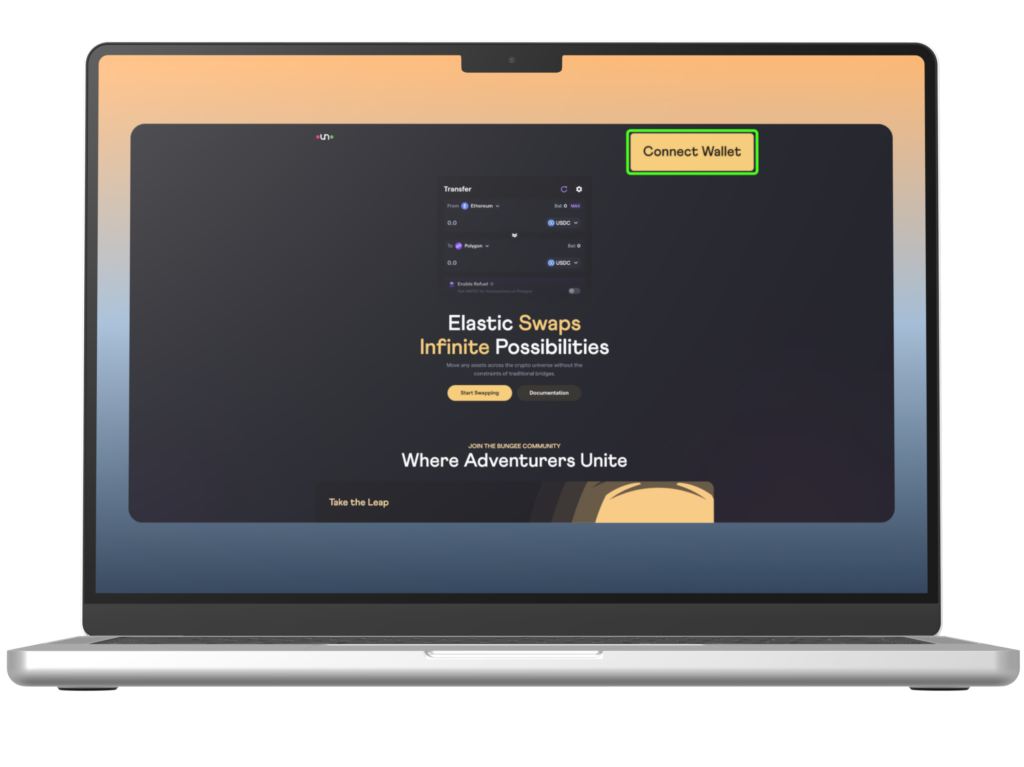
Step 1: open the aggregator and choose Connect Wallet
Go to the aggregator's website from a bookmark and select Connect Wallet. Some sites label the same button Connect or Login.
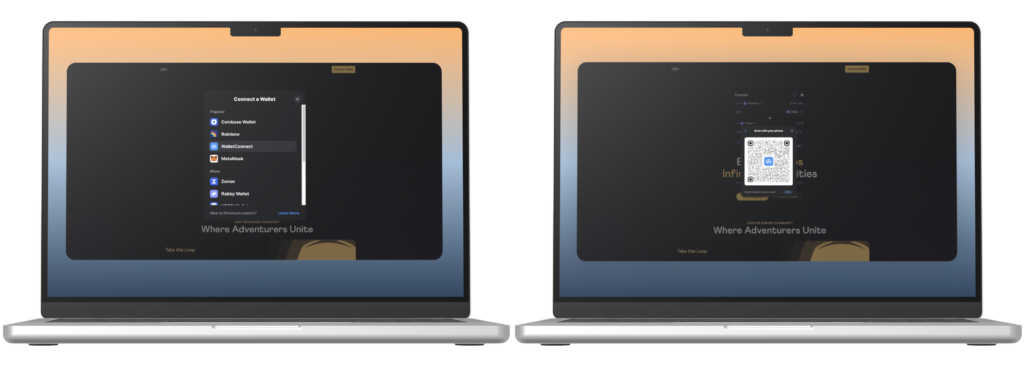
Step 2: select WalletConnect and show the QR code
In the list of wallet options pick WalletConnect. The site displays a QR code that encodes the connection request.
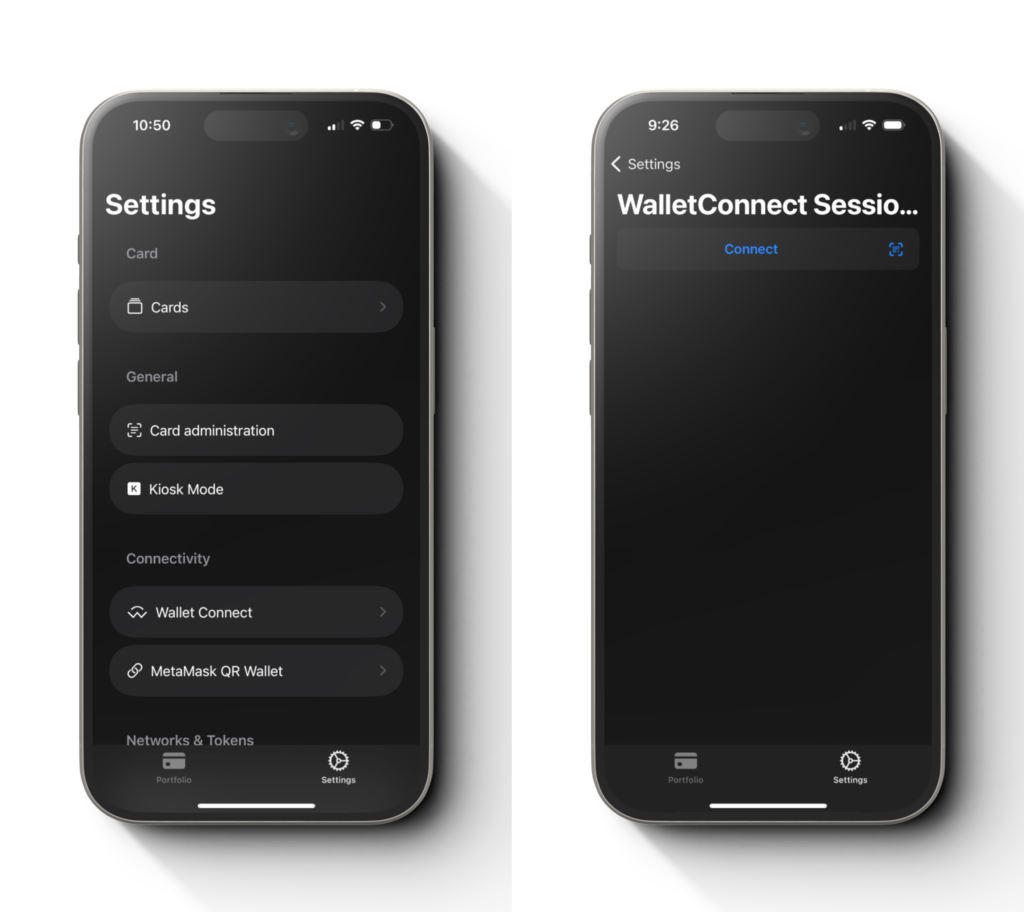
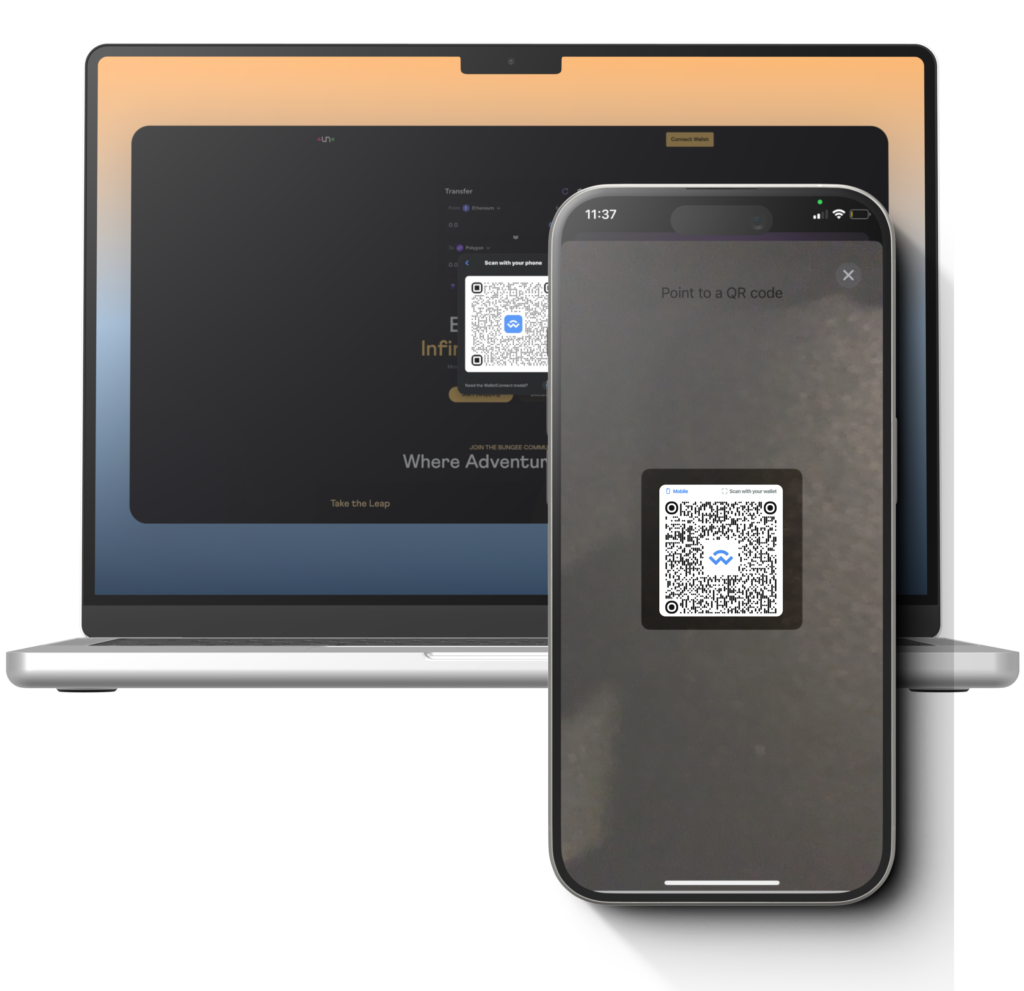
Step 3: scan the code from the Cryptnox app
In the Cryptnox Wallet app open Settings, select WalletConnect, press Connect and scan the QR code shown by the website.
Step 4: review the session and confirm
The app shows which site is asking to connect and which accounts it will see. Check the domain, then press Connect.
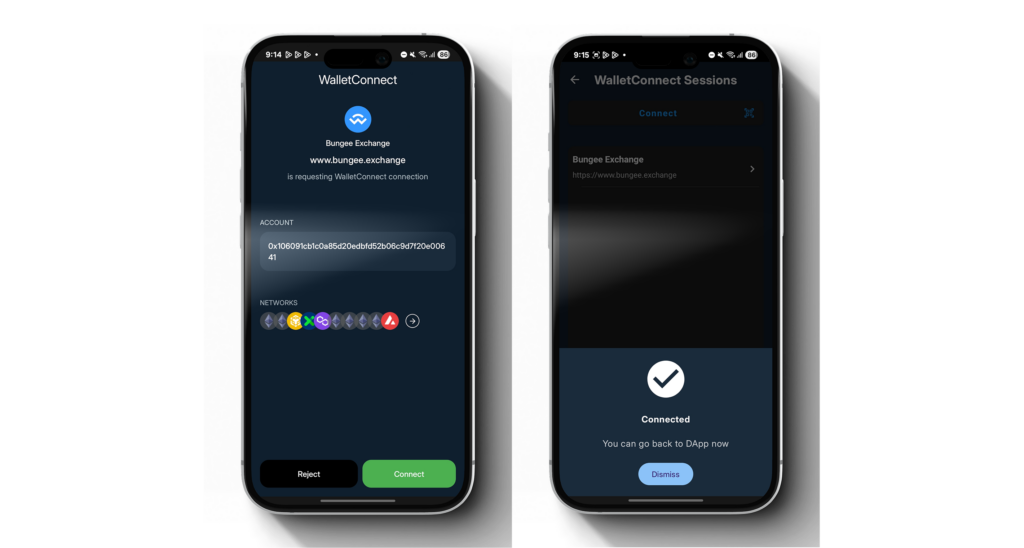
Step 5: tap the card
Hold the Cryptnox hardware wallet card flat against the back of the phone when prompted. The card signs the connection inside its secure element.
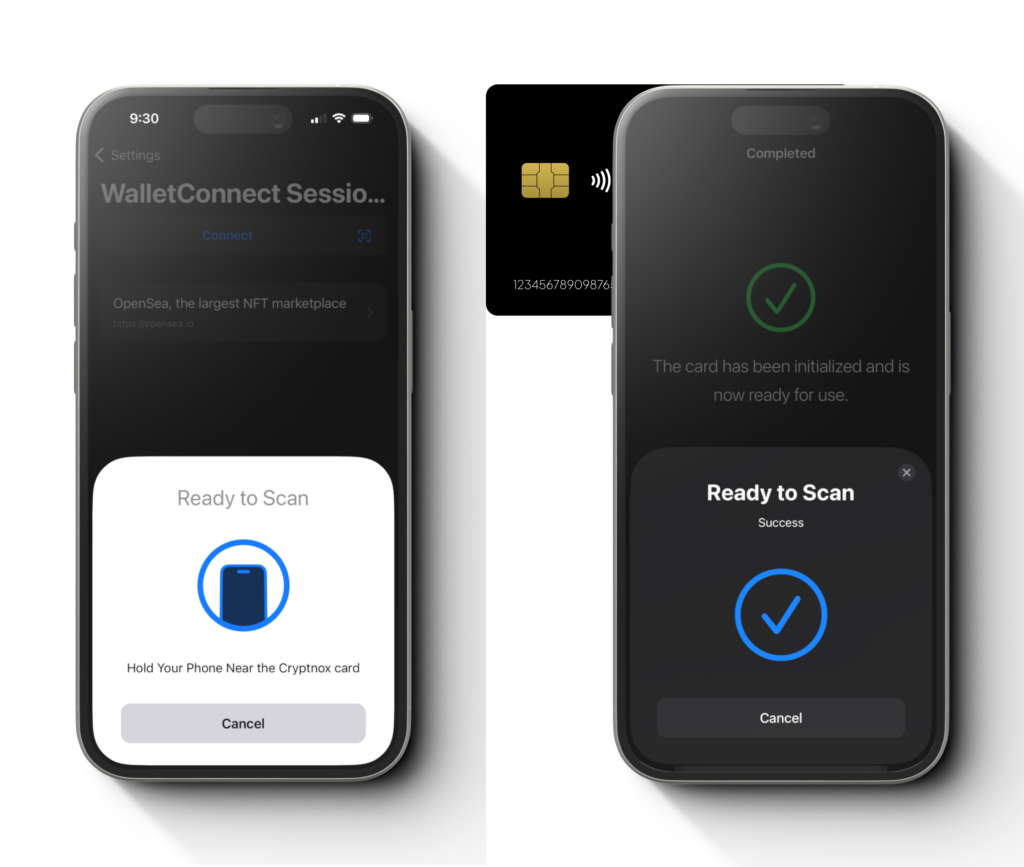
Step 6: accept on the website
Back on the site, select Accept and sign. Your card is now linked to the aggregator. Every swap or bridge transfer you start from here on appears as a request in the Cryptnox app and is approved with the same card tap, so nothing is signed without the card being physically present.
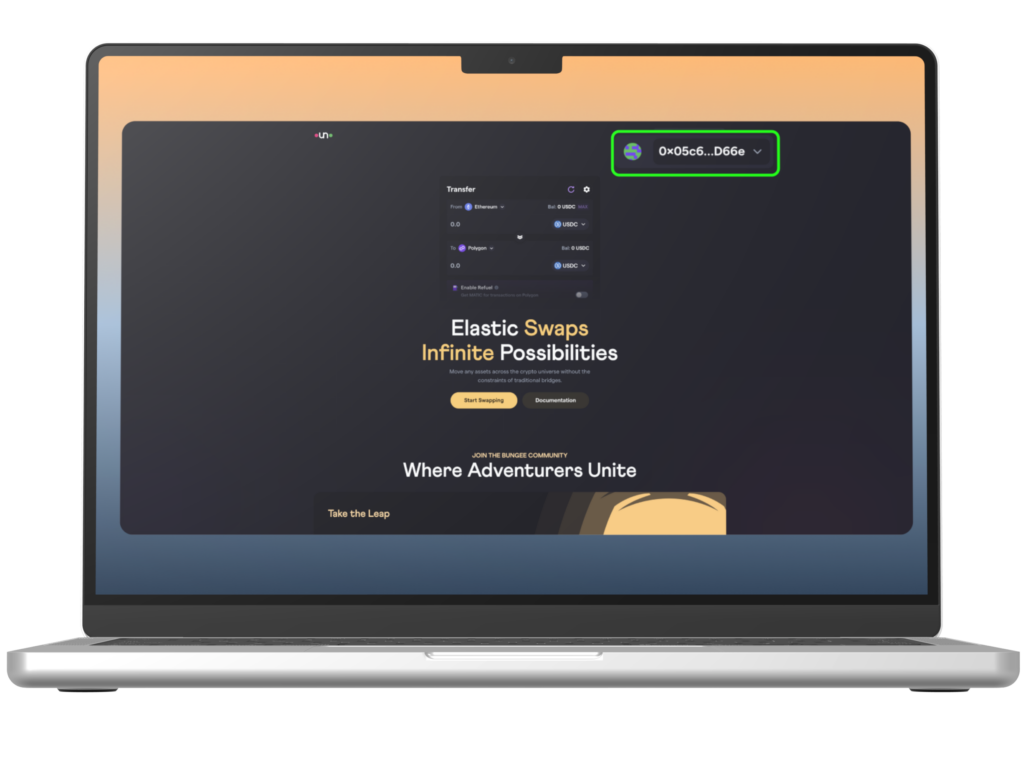
Two dedicated tutorials cover the same flow in more detail: how to use WalletConnect with the Cryptnox app and using WalletConnect from the phone's own browser. The security model is explained on the WalletConnect and Cryptnox card security page.
Which hardware wallets work with DeFi aggregators?
Any wallet that supports WalletConnect, or that offers a browser extension the aggregator lists, will connect. The differences are in where the key lives and what you have to do to sign. The Cryptnox hardware wallet card takes the smart-card approach:
What the card holds
The private key, generated inside an EAL6+ certified secure element and never exported. Signing happens on the card; the phone only relays. Credit-card format, NFC, no battery, no cable.
What the phone does
The free Cryptnox app for iOS and Android shows balances and requests, connects to websites through WalletConnect, and works with MetaMask. It cannot sign anything without the card being tapped.
The card supports Bitcoin, Ethereum, XRP, Tron and more than 1,000 EVM tokens, with further EVM networks added manually in the app, which covers the networks most bridge aggregators route between. It ships as a Dual-Card Set: both cards are initialised together and the second card is your backup, so there is no seed phrase to write down by default. On selected sets the card also carries FIDO2 as an extra function, so the same card can serve as a security key for your exchange and email accounts. Check the aggregator's chain list against the supported coins and networks before you start a route.
Buy from the Official CRYPTNOX Store

Prefer Amazon?
CRYPTNOX products are also available worldwide through our official Amazon stores.
